
Getting Started
This guide walks through a safe first organization run. It uses a separate output directory so you can inspect the result before changing your source library.
Audiobookshelf First-Run Flow
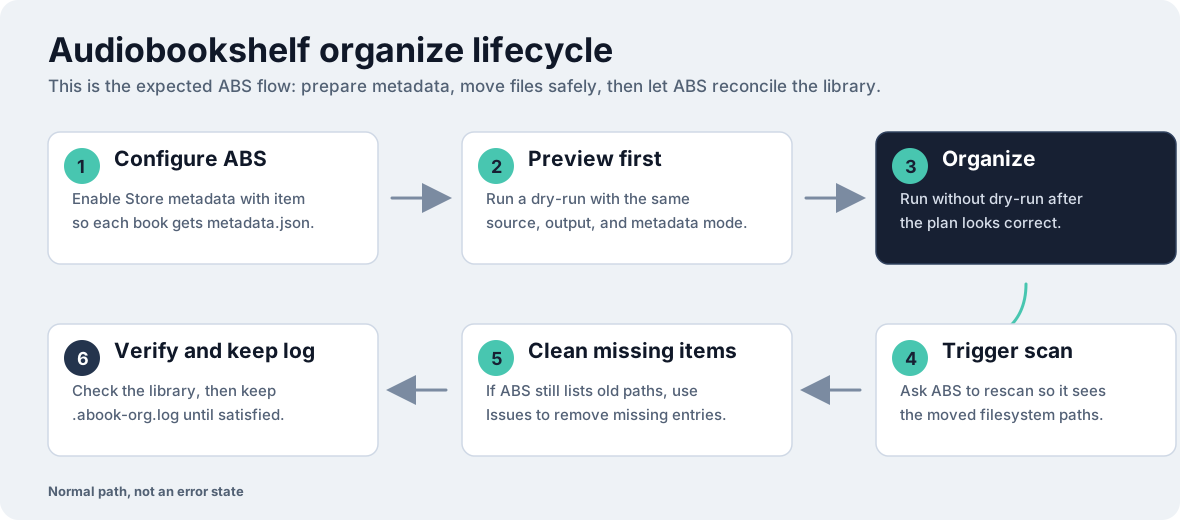
Section titled “Audiobookshelf First-Run Flow”For Audiobookshelf-managed libraries, use this cycle: configure ABS to write metadata.json files, preview, organize, scan ABS, clean up old missing paths if ABS still reports them, and keep the undo log until the library is verified.
Install
Section titled “Install”Install from Homebrew, Go, Docker, or a release archive:
brew tap jeeftor/tapbrew install audiobook-organizergo install github.com/jeeftor/audiobook-organizer@latestSee Installation for platform-specific options and package notes.
1. Configure Audiobookshelf
Section titled “1. Configure Audiobookshelf”
Before organizing an Audiobookshelf-managed library, enable Store metadata with item in the Audiobookshelf library settings.
That setting writes a metadata.json file beside each book when ABS metadata is generated or updated.
Those metadata.json files are the safest first metadata source for local organization because they keep the book-level title, author, series, narrator, and year data beside the audio files.
2. Preview With Dry Run
Section titled “2. Preview With Dry Run”Start with a small sample from your own library:
/books/source/ The Case of Charles Dexter Ward/ metadata.json 01 - Chapter 1.mp3Use a separate output folder for the first run:
/books/organized/If the source folder does not have metadata.json files, inspect embedded metadata before organizing:
audiobook-organizer metadata --dir=/books/source --use-embedded-metadataFor a flat folder of individual audiobook files, preview with --flat instead of the default directory-as-book behavior.
Run a dry run before moving files:
audiobook-organizer \ --dir=/books/source \ --out=/books/organized \ --dry-run \ --verboseCheck the planned destination paths, metadata warnings, and skipped books. Dry-run mode does not mutate the filesystem.
3. Organize
Section titled “3. Organize”When the preview looks right, remove --dry-run:
audiobook-organizer \ --dir=/books/source \ --out=/books/organizedThe organizer writes .abook-org.log so the operation can be undone.
4. Trigger Audiobookshelf Scan
Section titled “4. Trigger Audiobookshelf Scan”After a non-dry-run organization, run or trigger an Audiobookshelf library scan so ABS can discover the organized paths and reconcile moved files.
See Audiobookshelf for path mapping checks and scan commands.
5. Clean Missing Items
Section titled “5. Clean Missing Items”After the scan, ABS may still list old filesystem paths as missing. That is a normal cleanup step after moving files, not a failed organize run. Review the missing items in ABS, then use the missing-books cleanup action when the organized paths are already visible in the library.


6. Verify And Keep The Undo Log
Section titled “6. Verify And Keep The Undo Log”Check the organized library in your filesystem and in Audiobookshelf before deleting the undo log. Keep .abook-org.log until you are satisfied with the result.
If needed, undo the last organization operation from the source directory:
audiobook-organizer --dir=/books/source --undoRename operations use a separate .abook-rename.log file:
audiobook-organizer rename --dir=/books/source --undoSee Safety And Undo for the invariants and log behavior.
Next Steps
Section titled “Next Steps”- Use Layouts to choose a directory structure.
- Use Metadata Sources if metadata is missing or stored in custom fields.
- Use Rename to standardize filenames after metadata is correct.
- Use Audiobookshelf when your source of truth is an ABS server.